

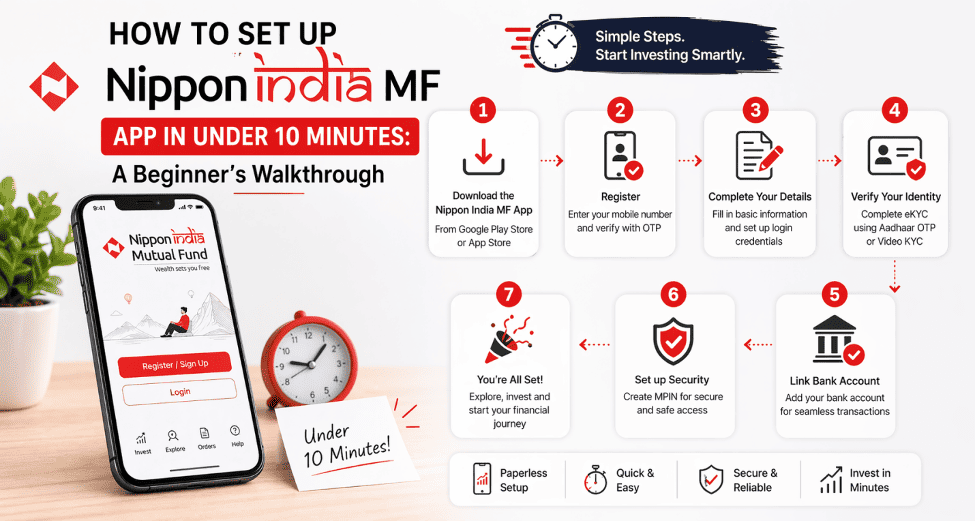
A common concern among new investors is the time and effort required to begin investing through digital platforms. Multiple steps, lengthy onboarding journeys, and unclear instructions often lead to hesitation. The Nippon India Mutual Fund (MF) Investor App addresses this by offering a simple and guided setup process. If you plan to download this MF app and start investing, you can complete the process quickly once your details are ready.
Step 1: Download and Register on the App
First, download and install the Nippon India Mutual Fund Investment App from the Play Store. Once installed, open the app and begin registration using your mobile number or email ID. You will need to:
- Verify your details through an OTP
- Set a secure MPIN
- Enable biometric login and MPIN-based access for faster and secure login
The interface is designed to be intuitive. Even first-time users can navigate the process without confusion.
Step 2: Complete Your KYC Digitally
A key requirement before investing is completing your KYC. The Nippon India Mutual Fund Investment App lets you complete this process within the app, without visiting any branch. You will need:
- PAN details
- Aadhaar-linked mobile number
- Basic personal information
The app supports DigiLocker integration, which helps fetch documents instantly. This reduces manual effort and speeds up verification. If your documents are ready, this step can typically be completed in a few minutes.
Step 3: Access Your Portfolio Dashboard
Once your KYC is complete, you gain access to a comprehensive portfolio dashboard. This section gives a clear overview of your investments and account activity. Here’s what you can do:
- Manage all investments in one place
- View returns and transaction history
- Track family investments through the Family View feature
To better understand this, the dashboard serves as a central view, eliminating the need for multiple platforms. It helps users stay informed and organised.
Step 4: Choose Your First Investment
Next, you can select how you want to invest. The app allows both Systematic Investment Plan (SIP) and one-time investments. A SIP lets you invest a fixed amount regularly. This approach supports disciplined investing over time. If you prefer flexibility, you can also choose a lump sum investment. The app guides you through scheme selection and investment steps in a structured manner. This reduces confusion, especially for beginners.
Step 5: Make a Secure Payment
Once you choose your investment, you can proceed with payment. The Nippon India Mutual Fund Investment App offers multiple secure options to complete transactions smoothly. These include:
- UPI-based payments
- Net banking
- One-Time Bank Mandate (OTBM)
The UPI mandate is useful for SIPs, as it enables automated payments without repeated approvals. This ensures consistency and ease of use.
Step 6: Explore Features That Simplify Investing
One reason this MF app in India is commonly chosen is its focus on simplifying the overall experience. The app includes features designed to reduce effort and improve usability. Key features include:
- A cart feature to invest in multiple schemes in a single transaction
- Biometric login for secure access and transaction authorisation
- Option to schedule transactions in advance for better planning
- Folio tagging with persona-based customisation for better organisation
These features help users complete tasks faster and manage investments without any hassle.
Step 7: Manage and Monitor Your Investments
After your first investment, managing your portfolio becomes simple. The app ensures that all information is available in one place. You can:
- Monitor performance regularly
- Modify or pause SIPs
- Redeem investments when required
A key benefit to consider is the ability to manage everything within a single platform. This removes the need for multiple logins and reduces operational effort.
Why This Setup Works for New Investors
Here’s what most users look for when starting their investment journey. The process should be simple, secure, and easy to follow. The Nippon India Mutual Fund Investment App is designed with these needs in mind. It focuses on:
- Simplified onboarding with guided steps
- Faster KYC through digital verification
- Clear portfolio visibility in one dashboard
- Secure and flexible payment methods
For investors across urban and semi-urban markets, this approach reduces common barriers and improves confidence.
Final Takeaway
If you are planning to begin your investment journey, choosing the right platform is important. The Nippon India Mutual Fund Investment App offers a simple setup process that can be completed quickly when your documents are ready. With its intuitive design and helpful features, this MF app helps users move from registration to investment without unnecessary delays. It provides a smooth experience for beginners seeking clarity, control, and convenience in one place.
